
Download Storly – Streamlined Storytelling for Nonprofits
Overview
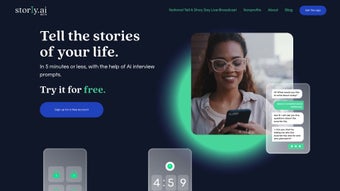
Storly is a web‑based AI writing assistant built specifically for nonprofit organizations that want to capture, curate, and share authentic stories from the people they serve. In the crowded nonprofit landscape, personal narratives are the most powerful way to build empathy, increase donor engagement, and amplify mission impact. Storly simplifies this process by turning a traditional, weeks‑long interview workflow into a few minutes of guided, AI‑enhanced conversation.
Users generate a personalized link, share it with community members, and let an intelligent interview engine ask tailored questions. Within seconds, the platform drafts a polished story ready for newsletters, social media, grant proposals, or impact reports. The full‑version license removes usage caps, ensuring that organizations of any size can rely on Storly for ongoing storytelling campaigns without worrying about hidden fees or limited quotas.
By providing a secure, cloud‑hosted environment, Storly guarantees that collected data remains confidential while still being easily exportable for downstream marketing tools. Whether you’re a small grassroots group or a large international NGO, Storly’s intuitive interface and AI‑driven efficiency make it a compelling addition to any communications toolkit.
Key Features that Empower Nonprofit Storytelling
- AI‑Generated Interview Prompts: The system crafts interview questions based on the organization’s focus area, ensuring relevance and depth.
- Instant Story Drafts: After a participant submits answers, Storly produces a fully formatted narrative in seconds.
- Customizable Branding: Add your nonprofit’s logo, colors, and tone guidelines so each story feels on‑brand.
- Secure Cloud Storage: All data is encrypted at rest and in transit, meeting GDPR and other privacy standards.
- Multi‑Channel Export: Export stories as PDF, Word, or directly to email marketing platforms like Mailchimp.
- Collaboration Dashboard: Team members can review, edit, and approve stories before publication.
- Analytics & Impact Metrics: Track story views, shares, and conversion rates to measure fundraising ROI.
- Full‑Version License: One‑time payment removes usage limits, making budgeting predictable for nonprofits.
- Responsive Web Interface: Works on any modern browser, so volunteers can collect stories from laptops, tablets, or smartphones.
- Integrations with CRM Systems: Sync donor data with Salesforce, HubSpot, or custom APIs for seamless workflow.
Each of these features was designed with the unique challenges of nonprofit communications in mind. The AI interview engine reduces the burden on staff and volunteers, allowing them to focus on relationship‑building rather than data entry. Instant story drafts cut down production time dramatically, which means campaigns can respond to emerging news cycles or donor trends without delay.
Branding tools ensure consistency across all touchpoints, reinforcing trust with supporters. Security and compliance are non‑negotiable for organizations handling sensitive personal stories, and Storly’s encrypted storage gives peace of mind. Finally, the analytics suite turns qualitative narratives into quantitative insights, helping fundraisers prove the impact of their storytelling investments.
Installation & Usage Instructions
Because Storly is a cloud‑based SaaS solution, there is no traditional “installation” process. Getting started is as simple as creating an account, configuring your organization profile, and generating your first story‑collection link. Follow these steps to launch your storytelling campaign:
- Create an Account: Visit the Storly website, click “Sign Up,” and provide basic information (name, nonprofit name, email). A verification email will confirm your identity.
- Choose Your License: Select the Full‑Version License. This one‑time payment unlocks unlimited story collection and removes watermarks.
- Set Up Your Profile: Upload your logo, define your brand voice (e.g., compassionate, hopeful), and configure privacy settings. You can also connect your CRM for automatic donor data sync.
- Generate a Collection Link: Within the dashboard, click “Create New Story Campaign,” name the campaign (e.g., “Community Voices 2025”), and let the AI suggest interview topics based on your cause.
- Share the Link: Distribute the unique URL via email newsletters, social media, or QR codes at events. Participants click the link, answer the AI‑driven questions, and submit their responses.
- Review Drafts: As stories arrive, they appear in the Collaboration Dashboard. Editors can refine language, add quotes, or request additional details.
- Publish & Distribute: Once approved, export the story to your preferred format and share it across email campaigns, blog posts, or donor reports.
- Monitor Performance: Use the built‑in analytics to see how many people view, share, or engage with each story, and adjust your outreach strategy accordingly.
The entire workflow can be completed in under an hour for a small batch of stories, and scales effortlessly for larger campaigns. Because the platform runs entirely in the browser, there’s no need for IT support or local software updates—Storly handles all maintenance, security patches, and feature rollouts on the server side. This “download‑free” approach is ideal for nonprofits with limited technical resources, allowing staff to focus on mission‑critical work rather than software management.
Compatibility and System Requirements
Storly is built on modern web technologies and works on any operating system that supports a current browser. The recommended browsers are Chrome (latest version), Firefox, Safari, and Edge. Because the application is cloud‑hosted, it does not depend on specific hardware or operating system specifications.
This means that volunteers can access Storly from Windows PCs, macOS laptops, Android tablets, or iOS devices without any additional plugins or extensions. For optimal performance, ensure that your internet connection is stable and provides at least 5 Mbps download speed, especially when uploading large multimedia assets such as photos or video clips that may accompany stories. The platform also supports screen readers and follows WCAG 2.1 AA guidelines, making it accessible for users with visual impairments.
While Storly does not require a dedicated server, organizations that wish to host their own data backups can enable the optional “Export to CSV” feature, which allows you to store raw story data on your internal systems. This is useful for NGOs with strict data‑retention policies or those that need to archive stories for regulatory compliance. The platform’s API also supports integration with custom backend services, so tech‑savvy teams can build additional workflows (e.g., automatic posting to WordPress or triggering SMS alerts when a new story is submitted). Overall, the cross‑platform compatibility of Storly eliminates the friction often associated with traditional desktop software, delivering a seamless, “download‑free” experience to every stakeholder.
Pros and Cons
Pros
- Rapid story creation reduces campaign lead times from weeks to minutes.
- AI‑driven interview prompts ensure consistent, high‑quality content.
- Full‑version license provides unlimited usage with a predictable cost.
- Secure, encrypted cloud storage meets privacy regulations.
- Easy integration with popular CRM and email marketing tools.
- Responsive design works on Windows, macOS, Android, and iOS.
- Built‑in analytics turn narratives into measurable impact metrics.
- Collaboration dashboard streamlines editing and approval workflows.
- No software download or local installation required.
- Accessibility features comply with WCAG 2.1 AA standards.
Cons
- Relies on internet connectivity; offline collection is not possible.
- AI-generated drafts may require human editing for tone nuance.
- Initial setup of brand voice and privacy settings can be time‑consuming.
- Limited customization of AI question algorithms beyond preset templates.
- Pricing model is a one‑time fee; ongoing support costs are not included.
Frequently Asked Questions
Can Storly be used for languages other than English?
Yes. Storly supports multiple languages, and the AI engine can generate interview prompts and story drafts in Spanish, French, and several other major languages. You can select the desired language in the campaign settings before sharing the collection link.
Is the data collected by Storly compliant with GDPR?
Absolutely. All personal information is encrypted both in transit and at rest. Storly provides tools for data export, deletion, and consent management to help you meet GDPR and other regional privacy requirements.
How does the pricing work for the full‑version license?
The full‑version license is a one‑time payment that unlocks unlimited story collection, removes watermarks, and grants access to all premium features. There are no recurring subscription fees, making budgeting straightforward for nonprofits.
Can I integrate Storly with my existing donor management system?
Yes. Storly offers native integrations with Salesforce, HubSpot, and a generic API that can be used to connect to most donor management platforms. You can map story data to donor records automatically, enriching your fundraising database.
What kind of support does Storly provide after purchase?
Purchasers receive email support, access to a knowledge base, and optional live chat during business hours. The support team can help with onboarding, troubleshooting, and best‑practice guidance for maximizing storytelling impact.
Conclusion & Call to Action
Storly delivers a powerful, AI‑driven solution that aligns perfectly with the storytelling needs of modern nonprofits. By turning a cumbersome interview process into a fast, secure, and brand‑consistent workflow, it empowers organizations to amplify the voices of the communities they serve. The combination of instant story drafts, robust analytics, and seamless integrations means that every narrative can be turned into a measurable asset for fundraising, advocacy, and outreach. While an internet connection is required and some human editing may still be necessary, the benefits far outweigh these minor limitations, especially for groups that need to move quickly and responsibly.
If you’re ready to elevate your nonprofit’s communications, capture authentic stories at scale, and connect deeper with donors, download Storly today. The one‑time full‑version license eliminates surprise costs, and the secure cloud platform ensures your data remains safe. Start a pilot campaign, experience the speed of AI‑generated narratives, and watch your impact metrics climb. Your community’s stories deserve to be heard—let Storly help you tell them.



.png)



